Accessibility Services

Clear accessibility assessments, practical fixes and expert support to help your team move forward with confidence.

Practical accessibility support that helps teams move forward.

We create accessibility assessments, VPAT/ACR documentation, design review documents, developer guidance and training with findings your team can understand, prioritise and fix.

Expertise in

  • WCAG
  • VPAT/ACR creation
  • Section 508
  • EN 301 549
  • European Accessibility Act (EAA)
  • AS 301 549

Trusted by government, enterprise and digital teams.

Australian Government Optus Telstra Nexer Digital Coles Supermarket Her Majesty's Courts and Tribunals Service

Support we can help you with

ASSESSMENT

We need to check accessibility

Find out how accessible your website, app or digital product really is. Get a clear WCAG assessment with practical findings your team can act on.

  • WCAG 2.2 review
  • Screen reader testing
  • Prioritised findings
COMPLIANCE

We need a VPAT completed or ACR

Need accessibility documentation for a tender, contract or customer request? We’ll create a clear ACR using the VPAT format.

  • ACR documentation
  • VPAT support
  • Clear evidence trail
SUPPORT

We need help fixing issues

We’ll help your team prioritise the issues from an assessment, and turn them into practical design and code changes.

  • Code recommendations
  • Component reviews
  • Issue triage
CAPABILITY

We need to build team confidence

We'll help you build knowledge across your team. Guiding designers, developers and content teams to understand what accessible looks like.

  • Team workshops
  • Coaching sessions
  • Custom content

What you receive from our accessibility assessment

  • WCAG 2.2 AA assessment

    Manual testing against WCAG success criteria across key pages and flows.

  • Clear findings with severity & impact

    Issues explained in plain language with user impact and priority.

  • Practical remediation guidance

    Code-level recommendations and examples your team can use.

  • Screen reader & keyboard testing

    Real user testing with assistive technologies and keyboard only.

  • Steps to reproduce

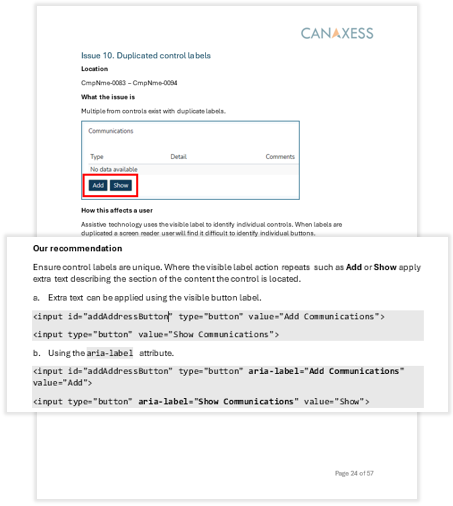
    Detailed steps, screenshots and videos to replicate issues.

  • Retesting & ongoing support

    Re-test fixes and get guidance until issues are resolved.

A clear process from assessment to action

We keep the process straightforward and support your team every step of the way.

  1. 1

    Scope

    Tell us what you’re building, selling or trying to fix.

  2. 2

    Review

    We assess key pages, workflows, components and states.

  3. 3

    Explain

    You get clear findings, severity and practical recommendations.

  4. 4

    Support

    We help your team understand and resolve the issues.

  5. 5

    Retest

    Confirm fixes and support certification or documentation needs.

Let’s start the conversation.

Tell us a bit about what you’re working on, and we’ll be in touch to explore how we can help you.